Tampilkan postingan dengan label Software. Tampilkan semua postingan

Kaspersky® 2013

Diterbitkan oleh d&p production Jumat, 07 September 2012 0 comments


Kaspersky Lab memperkenalkan seri terbaru dari produk keamanan konsumen andalannya, yaitu Kaspersky Internet Security (KIS) 2013 dan Kaspersky Anti-virus (KAV) 2013 di Indonesia pada Rabu (5/9/2012). Versi terbaru ini hadir dengan tampilan antarmuka dan beberapa teknologi baru.

Ada dua teknologi baru yang dikedepankan di KIS 2013 dan KAV 2013. Kedua teknologi tersebut adalah Automatic Exploit Prevention (AEP) dan Safe Money.

Teknologi AEP diklaim mampu melindungi sistem komputer pengguna dari beberapa ancaman yang mengeksploitasi kerentanan pada piranti lunak. Ancaman yang disebut sebagai "Vulnerability attack" tersebut memang telah lama digunakan oleh penjahat cyber untuk melakukan kejahatan. Jenis serangan ini mencari celah pada piranti lunak untuk dimasukkan script berbahaya.

Teknologi AEP didesain agar mampu mengontrol dan memonitor aplikasi yang berbahaya. Apabila pengguna baru membuka aplikasi, maka AEP akan langsung bekerja, memeriksa apakah aplikasi tersebut berbahaya atau tidak. Selain itu, teknologi tersebut juga mampu untuk melindungi celah keamanan dari sebuah piranti lunak.

Kaspersky mengklaim kalau teknologi AEP mampu mengenali aktivitas suatu eksploitasi tanpa mengganggu pengoperasian normal program yang memiliki potensi kerentanan, seperti web browser dan document viewer.

Teknologi Safe Money diperuntukkan bagi pengguna yang gemar melakukan transaksi online.

Cara kerja Safe Money cukup sederhana. Pada saat pengguna ingin melakukan pembayaran, teknologi ini akan langsung melakukan pemeriksaan URL. Cara ini mampu memeriksa keaslian situs pembayaran tersebut.

Teknologi Safe Money akan secara otomatis mengubah mode browser yang digunakan untuk transaksi online. Mode yang akan digunakan adalah "Safe". Safe Mode mampu mengisolasi kegiatan pembayaran dari aktivitas online lainnya untuk memastikan transaksi tidak dimonitor.

Kemudian, Safe Money akan mengevaluasi status keamanan komputer. Jika aman, pengguna dapat menggunakan virtual keyboard dari Kaspersky untuk memastikan password dan nomor kartu kredit aman.

Fitur antara KIS 2013 dan KAV 2013 tidaklah terlalu berbeda. KAV 2013 hadir dengan teknologi AEP, tetapi tidak dilengkapi Safe Money. Sedangkan KIS 2013 dilengkapi dengan keduanya. Keduanya memiliki inti perlindungan yang sama.


Source


Sama seperti versi-versi sebelumnya, KIS 2013 tidak dijual dengan gratis tetapi anda diharuskan untuk membeli sebuah lisensi key untuk 1 tahun pemakaian dengan harga $59,95 ( Website Resmi Kaspersky 2013, Bisa dilihat disini ). Namun anda tidak perlu khawatir, dikarenakan pada website ini saya akan menyediakan lisensi key tersebut secara gratis untuk anda. Untuk link download key terbaru dari KIS 2013 silahkan dilihat pada akhir postingan ini.

Agar anda dapat lebih jelas untuk mengetahui fitur-fitur terbaru apakah yang ada pada KIS 2013 ini, berikut saya tampilkan cuplikan yang saya ambil dari situs resmi Kaspersky Internet Security :


Benefits

Protects against all viruses and Internet threats

By combining cloud-based functionality and powerful security technologies that run on your PC, Kaspersky Internet Security 2013 delivers more effective defences against today’s increasingly complex threats – so you’re able to enjoy the Internet, while Kaspersky protects you, your PC and your children. 
In addition to including all of the features offered by Kaspersky Anti-Virus 2013, Kaspersky Internet Security 2013 delivers many innovative, new technologies that are essential to defending you against sophisticated threats on the Internet.  With Safe Money, Secure Keyboard and other unique features, Kaspersky Internet Security 2013 does more to help ensure you can get the best out of the Internet… without compromising your safety.

Detects new, emerging and unknown threats

The cloud-based Kaspersky Security Network gathers data from millions of participating users’ systems around the world… to help defend you from the very latest viruses and malware attacks.  Potential threats are monitored and analysed – in real-time – and dangerous actions are completely blocked before they can cause any harm.

Identifies suspicious websites and phishing websites

Advanced anti-phishing technologies proactively detect fraudulent URLs and use real-time information from the cloud, to help ensure you’re not tricked into disclosing your valuable data to phishing websites.  Our URL Advisor also adds colour-coded tags to all web links – to advise you of the danger level of the link and subsequent pages.

Delivers greater security for online shopping and banking 

Kaspersky Internet Security has always included additional layers of security that help to keep your information safe during online transactions.  Now, with the introduction of our unique Safe Money technology, you benefit from even greater protection.  Safe Money automatically checks that the website you’re visiting is secure – and it also offers to open the website in a special, protected mode… to help keep your credit card number and other personal data safe from cyber thieves. 

Protects your privacy and your digital identity

Kaspersky Internet Security 2013 provides a wide range of technologies to protect your privacy and your identity – including two unique security features for entering personal information online:
  • Secure Keyboard is a new Kaspersky technology that automatically activates whenever you open a bank website or payment website – or you enter a password within any web page – to ensure that information you enter using your physical keyboard can’t be accessed by keyloggers
  • For our ultimate protection, Kaspersky’s improved Virtual Keyboardfeature allows you to use mouse-clicks to enter your banking information – so that keystrokes can’t be tracked or stolen by keyloggers, hackers or identity thieves

Keeps your children safe and responsible

Award-winning family protection features help you to keep your children safe and also give you greater control over your children’s access to the PC, the Internet, applications, games and websites. You can block, limit or log your children’s Instant Messaging and social network communications – and block the transfer of private data, such as phone or credit card numbers.

Prevents malware from exploiting vulnerabilities in your PC

If your PC has application or system vulnerabilities that haven’t been updated with the latest fixes, cyber criminals and malware could gain entry. In addition to scanning for vulnerabilities, Kaspersky Internet Security 2013 analyses and controls the actions of programs that have vulnerabilities – so they can’t cause any harm.

Automatic download and installation features – save you time and effort

Installation now requires far fewer manual steps.  When you first download the product from our website, it automatically checks for the latest product version – disinfects existing malware, if necessary – and then starts the installation.

Compatible with Windows 8

Kaspersky Internet Security 2013 is fully compatible with Microsoft’s latest operating system – Windows 8 – and is integrated with Microsoft’s latest IT security innovations. In addition, Kaspersky Now – a new application that has been developed to support Microsoft’s new user interface – lets you monitor your PC’s security status and launch vital security features.


Key Features

Safe Money adds even stronger security for online banking and shopping New!
Kaspersky Internet Security has always provided protection for online transactions... and, in the latest version, whenever you attempt to log on to an online bank, a payment system website or an e-commerce site, our unique, new Safe Money feature will:
  • Compare the website’s URL with a database of secure sites
  • Check the certificate used to set up the secure connection – to avoid any behind-the-scenes transition from your intended site to a ‘fake’ site
  • Check your system for online banking vulnerabilities related to your PC’s operating system
  • Automatically suggest opening the site in the Safe Money mode – for added security against the theft of personal and financial data
... so Kaspersky’s advanced technologies are always protecting you when you’re online – shopping, banking and more.
Secure Keyboard protects the personal data you enter via your keyboard New!
Because keyloggers can record the keystrokes you use to enter your credit card number or other valuable information via your keyboard, Kaspersky Internet Security 2013 includes our new Secure Keyboard technology. When you open a bank or payment website – or enter a password within any web page – Secure Keyboard automatically opens... to keep your data safe from keyloggers.
System Watcher
Even if an unknown piece of malware manages to get onto your PC, Kaspersky’s unique System Watcher will detect dangerous behaviour and allow you to undo or rollback most malicious actions.
Parental Control Improved!
A new Parental Control engine includes new and improved protection for children that use your PC. Kaspersky Internet Security 2013 allows more effective control over children’s use of both the PC and the Internet – and provides more reliable filtering of websites that contain inappropriate content.
New anti-spam module Improved!
Kaspersky Internet Security 2013 includes a new, improved anti-spam module that provides more reliable filtering of unwanted messages and also includes enhanced reporting about detected spam.
Better anti-phishing protection Improved!
A new anti-phishing engine improves your defences against Internet fraudsters’ attempts to gain access to your personal information.
Automatic Exploit Prevention New!
Even if your PC and the applications running on it haven’t been updated with the latest fixes, Kaspersky Internet Security 2013 can prevent exploitation of vulnerabilities by:
  • controlling the launch of executable files from applications with vulnerabilities
  • analysing the behaviour of executable files for any similarities with malicious programs
  • restricting the actions allowed by applications with vulnerabilities
Minimal impact on PC performance for a range of usage scenarios Improved!
Kaspersky Internet Security 2013 is optimised so that it does not have a significant impact on network activity, the installation of programs, the launch of web browsers or the launch of programs. In addition, a special Gamer Mode ensures an uninterrupted game experience – while still keeping you secure.
Optimised antivirus databases Improved!
With antivirus information provided from the cloud, we’ve significantly reduced the size of the antivirus databases stored on your PC – which helps to improve performance and reduce the time taken for installation and updates.
Reduced Battery Drain New!
When it’s installed on a laptop that is running on battery power, Kaspersky Internet Security 2013 automatically reduces its usage of resources – to help increase the time the laptop can run before needing to be recharged.
Easy-to-use interface Improved!
The main interface window is optimised to help boost performance and ease of use for many popular user scenarios – including launching scans and fixing problems.
Quick launch of Virtual Keyboard Improved!
Virtual Keyboard allows you to use mouse-clicks to enter your banking information online – so your personal information can’t be tracked or stolen by keyloggers, hackers or identity thieves. Now, Kaspersky Internet Security 2013 allows fast access to the Virtual Keyboard from web-browsers.
Compatible with Windows 8… and delivers additional security New!
In addition to being fully compatible with Windows 8, Kaspersky Internet Security 2013 includes features that provide even greater protection:
  • Kaspersky Now is a new application that has been developed to integrate with Microsoft’s new user interface – to display your PC’s protection status and enable the rapid launch of vital security features
  • For other applications that are compatible with Microsoft’s new user interface, Kaspersky technologies scan the applications for viruses – and infected applications are removed and then replaced with clean applications
  • Integration with Early-Launch Anti-Malware (ELAM) technology – to provide protection even before your PC boots up
  • Integration with Windows Security Centre’s newly enhanced functionality


System Requirements

Operating Systems

Operating Systems*Hardware Requirements
  • Microsoft Windows XP Home Edition (Service Pack 2 or higher)
  • Microsoft Windows XP Professional (Service Pack 2 or higher)
  • Microsoft Windows XP Professional x64 Edition (Service Pack 2 or higher)
  • Processor 800 MHz or higher
  • 512 MB available RAM
  • Microsoft Windows Vista Home Basic (32/64 Bit) (Service Pack 1)
  • Microsoft Windows Vista Home Premium (32/64 Bit) (Service Pack 1)
  • Microsoft Windows Vista Business (32/64 Bit) (Service Pack 1)
  • Microsoft Windows Vista Enterprise (32/64 Bit) (Service Pack 1)
  • Microsoft Windows Vista Ultimate (32/64 Bit) (Service Pack 1)
  • Microsoft Windows 7 Starter
  • Microsoft Windows 7 Home Basic (32/64 Bit)
  • Microsoft Windows 7 Home Premium (32/64 Bit)
  • Microsoft Windows 7 Professional (32/64 Bit)
  • Microsoft Windows 7 Ultimate (32/64 Bit)
  • Processor: 1 GHz or higher
  • 1 GB available RAM (32 Bit) or 2 GB available RAM (64 Bit)
  • Microsoft Windows 8 (32/64 Bit)
  • Processor: 1 GHz or higher
  • 1 GB available RAM (32 Bit) or 2 GB available RAM (64 Bit)

Required for all Installations
  • Approximately 480 MB free space on the hard drive (depending on size of antivirus database)
  • CD/DVD Drive – for installation of the program from CD ROM
  • Computer mouse
  • Internet connection – for product activation
  • Microsoft Internet Explorer 8 or higher
  • Microsoft Windows Installer 3.0 or higher 
Hardware Requirements for Netbooks
  • CPU: Intel Atom 1.6 GHz
  • RAM:  1 GB DDR2
  • Hard Disk: 160 GB
  • Video Card: Intel GMA950
  • Screen: 10.1 inch, 1024x600 widescreen
  • Operating System: Microsoft Windows XP Home Edition


Download Untuk Kaspersky Internet Security 2012


Download Untuk KEY Kaspersky 2013


Key Kaspersky 2013
Pass : diepa3d

Check Kesehatan Flashdisk dengan H2testw Ver. 1.4

Diterbitkan oleh d&p production Minggu, 09 Oktober 2011 0 comments

H2testw 1.4 - Size : 213 KB

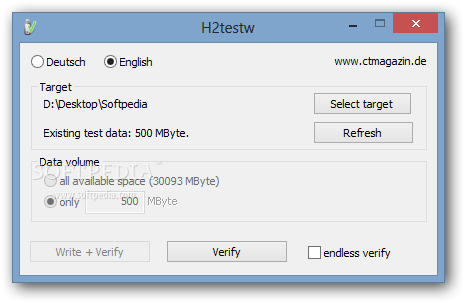
H2testw adalah program yang sederhana dan mudah digunakan yang dirancang untuk memungkinkan Anda untuk menguji stik USB untuk berbagai jenis kesalahan.
Hal ini juga dapat digunakan untuk media penyimpanan lain seperti kartu memori, hard drive internal dan eksternal dan bahkan network volumes.

Selain itu bisa mengetest Flashdisk Asli atau Palsu pada saat membeli Flashdisk. Kebanyakan Flashdisk not Original banyak titik error.

  • Jika Flashdisk dalam keadaan Sehat / Original.


  • Jika Flashdisk dalam keadaan Sakit / Not Original. Data errornya banyak terlalu besar
    Jika di isi lebih dari 50% kapasitas ... data langsung hilang ....atau flashdisk rusak.


Namun berhati - hatilah saat membeli Flashdisk / USB External maupun Internal. Sangat di rekomendasikan untuk mengecek kesehatan USB tersebut.


Program ini Freeware dan bersifat portable, anda tidak perlu Menginstal lagi pada saat menjalankan program ini. Anda dapat mendownload dimana saja. Tetapi disini kami menyediakan untuk anda sehingga anda tidak perlu repot - repot mencari nya.


http://www.mediafire.com/download.php?5v69sewt7wku3w5

IDM v6.07 Build 12 Final Retail

Diterbitkan oleh d&p production Sabtu, 08 Oktober 2011 0 comments

Internet Download Manager Ver. 6.07 Build 12 Final Release

Internet Download Manager memiliki logika download accelerator cerdas yang segmentasi file fitur cerdas dinamis dan teknologi download multipart aman untuk mempercepat download Anda. Tidak seperti akselerator download lain dan manajer bahwa segmen file sebelum mulai men, Internet Download Manager segmen download file secara dinamis selama proses download. Internet Download Manager reuses tersedia koneksi tanpa tambahan menghubungkan dan login langkah untuk mencapai kinerja percepatan yang lebih baik.


Tambahan Fitur di IDM Ver. 6.07 Build 12 Final Release
  • Added support for Firefox 8
  • Improved video discovery on youtube
  • Fixed bugs
  • Added video stream recognition for several new web players
  • Fixed a critical bug in 64bit versions of Windows 

Jika anda ingin mendapatkan software ini di situs resmi nya anda perlu cukup membayar $24.95, tetapi disini kami menyediakannya secara cuma - cuma / Gratis.

Original Site : Internet download manager


http://www.mediafire.com/download.php?6wqaaszhme7nxrn

Fix Bad Sector with HDD Regenerator

Diterbitkan oleh d&p production 0 comments


BAD SECTOR adalah sebuah ketakutan yang dapat membuat tidak tidur semalaman karena masalah Hard Drive terkena kerusakan. BAD SECTOR adalah kerusakan pada sektor didalam Hard Disk. Hal ini bisa disebabkan banyak hal seperti putaran Hard Disk berhenti tiba-tiba karena pemutusan listrik, terjadi goncangan seperti terjatuh, atau bisa juga karena benda magnetis yang lebih kuat berada disekitar Hard Disk.


BAD SECTOR atau kerusakan sektor pada Hard Disk dapat dikategorikan menjadi 2 hal. Pertama HARD BAD SECTOR dan SOFT BAD SECTOR. Hard Bad sector adalah kerusakan sektor secara fisik. Biasanya kerusakan seperti ini tidak dapat diperbaiki lagi. Adapun penyebabnya adalah Hard Disk terjatuh atau terguncang secara kuat, karena Head pembaca lemah, dan terkena benda magnetis yang telalu kuat, hingga mengakibatkan permukaan piringan Hard Disk tergores atau rusak akibat hal diatas tersebut.


Sedangkan SOFT BAD SECTOR yaitu kerusakan Sektor pada Hard Disk dikarenakan kerusakan pada lapisan program didalam piringan Hard Disk, hal ini disebabkan karena kesalahan dalam melakukan partisi hingga partisi rusak dan tidak dapat dibaca lagi, kedua karena pemutusan arus secara tiba-tiba hingga membuat kerusakan data didalam partisi.


Disini saya mencoba membagi pengalaman dalam memperbaiki Hard Disk yang terkena BAD SECTOR. Tipe Bad Sector yang dapat diperbaiki adalah tipe SOFT BAD SECTOR. Mengapa.? karena pada tipe ini BAD SECTOR terjadi karena kesalahan pemograman didalam sektor. Oleh sebab itu disini dapat di tulis ulang kembali seluruh sektor yang ada didalam Hard Disk dengan menggunakan software HDD REGENERATOR.


PERHATIAN...

Pengguanan Software HDD REGENERATOR dapat menghapus seluruh data didalam Hard Disk, karena software ini menulis ulang seluruh sektor dan track pada Hard Disk hingga seperti baru kembali. Bila anda ingin memiliki software ini di situs resminya software ini di hargai $ 53.95, tetapi disini anda dapat mendownloadnya secara gratis.

Original Site : HDD Regenerator


http://www.mediafire.com/download.php?9ao0mm4lsluv434


Autodesk Maya 2012 Subscription Advantage Pack Win/Mac/Linux

The Autodesk® Subscription Advantage Pack for Autodesk® Maya® 2012 software provides new tools to help manage increasing scene complexity required by today’s games, film, and television productions.


Fitur : 
  • Alembic point caching—Efficiently manage complex simulated and animated data, with the ability to read and write Alembic open computer graphics interchange format.
  • Bullet Physics—Create highly realistic soft body, rigid body, and ragdoll simulations with high-performance open source AMD Bullet Physics engine.
  •  New Node Editor—Manage and debug complex node networks with a new Node Editor that features drag-and-drop connections, color coding, and three levels of detail.


http://www.filesonic.com/folder/12864151


http://www.fileserve.com/list/tVRhqPe


http://www.wupload.com/folder/681076


Autodesk Subscription Advantage Packs for Autodesk 3ds Max and Autodesk 3ds Max Design 2012 adalah software memberikan solusi baru yang membantu anda membuat dan memperbaiki tampilan yang anda butuhkan, lebih cepat dan lebih mudah dari Autodesk 3ds Max sebelumnya.


Fitur : 
  • Render pass system—Segment your scene for downstream compositing with an entirely new render pass system that features a visual interface.
  • After Effects and Photoshop interoperability—Enjoy significantly enhanced interoperability with Adobe After Effects and Adobe Photoshop software.
  • ActiveShade for iray— Experience a truly iterative creative process for finalizing renderings with new ActiveShade support for the iray renderer from mental images.
  • .NET Exposure of 3ds Max SDK—Take advantage of .NET enabled languages to extend and customize certain features of 3ds Max.


 Thank's to Erick3d and ironboy.


Kaspersky® Internet Security 2012

Diterbitkan oleh d&p production Jumat, 07 Oktober 2011 0 comments

Kabar baik bagi anda para pengguna Kaspersky Internet Security. Kini telah hadir versi baru dari Kaspersky Internet Security yaitu Kaspersky Internet Security 2011. Setelah beberapa waktu sebelumnya telah diluncurkan versi dari KIS 2011 ini, namun kali ini pihak Kaspersky telah merelease versi baru dari KIS 2012 dan telah dijual di pasaran. Pihak Kaspersky mengklaim bahwa versi kali ini lebih baik dan penyempurnaan dari versi-versi sebelumnya, namun untuk featurenya sendiri tidak banyak berubah dari KIS 2012 sebelumnya akan tetapi terdapat tampilan yang berbeda serta proteksi yang lebih baik dari versi sebelumnya.


Kebetulan saya sendiri merupakan salah satu pengguna KIS, jadi pada saat dirilisnya KIS 2012 ini, saya langsung download dan mencoba kehebatan KIS 2012 ini. Dan ternyata memang masih seperti versi-versi sebelumnya, kehebatan dari KIS 2011 ini memang tidak diragukan lagi. Akan tetapi, pada saat pertama kali anda menginstall software ini seperti versi-versi sebelumnya, membutuhkan waktu yang agak lama dalam proses update database untuk pertama kalinya, dikarenakan file yang harus di update mencapai 100an MB. Oleh karena itu saran saya, dibutuhkan koneksi internet yang agak cepat dan stabil, agar proses update tidak berhenti di tengah-tengah yang mengharuskan anda untuk mengulangi proses update dari awal.


Sama seperti versi-versi sebelumnya, KIS 2012 tidak dijual dengan gratis tetapi anda diharuskan untuk membeli sebuah lisensi key untuk 1 tahun pemakaian dengan harga $59,95 ( Website Resmi Kaspersky 2012, Bisa dilihat disini ). Namun anda tidak perlu khawatir, dikarenakan pada website ini saya akan menyediakan lisensi key tersebut secara gratis untuk anda. Untuk link download key terbaru dari KIS 2012 silahkan dilihat pada akhir postingan ini.

Agar anda dapat lebih jelas untuk mengetahui fitur-fitur terbaru apakah yang ada pada KIS 2012 ini, berikut saya tampilkan cuplikan yang saya ambil dari situs resmi Kaspersky Internet Security :


Benefits

Enjoy secure online banking and shopping

Kaspersky Internet Security 2012 warns you about potential phishing attacks and malicious websites and secures your sensitive personal information such as login credentials, credit card details, etc. Enjoy complete peace of mind when you shop and bank online!

Get effective protection from unknown threats

Block unknown malware threats with the help of automatic monitoring, analysis and Kaspersky Lab’s cloud-based technologies that detect malware behavior patterns in application and system activities before they can harm your PC.

Communicate in safety on your favorite social networks

Our security software constantly monitors Internet traffic and protects you from accidentally launching malware or following links to phishing websites when you are using Facebook, Twitter and other social networks. Plus, your account details, pictures and other personal information stay safe.

Get immediate protection from emerging threats

Keep your computer protected against the latest malware threats with the help of cloud-based technologies that leverage information from the Kaspersky Security Network [KSN] - Kaspersky Lab’s globally-distributed threat monitoring network which gathers information regarding new threats from millions of users’ computers around the globe.

Roll back changes made by malware

Safely undo changes that malware makes to your computer, ensuring no harm comes to your PC.

Benefit from hybrid protection

Whenever and wherever you use your PC and the Internet, take advantage of hybrid protection that brings together the latest information about malware threats from the cloud with the security capabilities in Kaspersky Internet Security 2012 installed on your computer for unbeatable protection.

Protect your identity from phishing attacks

Prevent cybercriminals from stealing your digital identity thanks to anti-phishing protection technologies inside Kaspersky Lab’s Internet security software which leverage lists of known phishing websites, proactive anti-phishing technologies and the latest information from the cloud.

Supervise your children’s computer use

You manage when and how often your children access the PC and Internet and which games, websites and applications they use. Plus, you choose who your children communicate with via Instant Messaging and social networks and what their messages contain using predefined rules.


-- Key Features --

Kaspersky URL Advisor Improved!
Marks web links with a color-coded tag that shows their danger level and allows you to choose whether to open them

Kaspersky File Advisor
Checks file safety with a single click of the mouse New!

System Watcher Improved!
Monitors suspicious application activities and allows you to roll back system changes made by malware

Application Control Improved!
Restricts program access to personal data and system files according to the level of danger that each program presents

Safe Run Mode
Lets you launch suspicious applications and websites in a special, isolated environment where they cannot harm your computer

Two-way personal firewall
Protects against hacker attacks

Anti-Phishing and Anti-Spam technology Improved!
Provides reliable protection for your personal information and guards against unwanted spam and adware

Parental Control Improved!
Provides flexible and effective settings to keep children extra-safe when they use computers and the Internet

Completely redesigned interface New!
Makes navigating around security settings inside Kaspersky Internet Security 2012 quick and easy


System Requirements

Operating Systems

  • Microsoft Windows XP Home Edition (Service Pack 2 or higher)
  • Microsoft Windows XP Professional (Service Pack 2 or higher)
  • Microsoft Windows XP Professional x64 Edition (Service Pack 2 or higher)


Compatible With Windows 7


  • Microsoft Windows Vista Home Basic (32/64 Bit)
    Microsoft Windows Vista Home Premium (32/64 Bit)
    Microsoft Windows Vista Business (32/64 Bit)
    Microsoft Windows Vista Enterprise (32/64 Bit)
    Microsoft Windows Vista Ultimate (32/64 Bit)
    Microsoft Windows 7 Starter (32/64 Bit)
    Microsoft Windows 7 Home Basic (32/64 Bit)
    Microsoft Windows 7 Home Premium (32/64 Bit)
    Microsoft Windows 7 Professional (32/64 Bit)
    Microsoft Windows 7 Ultimate (32/64 Bit)


Hardware Requirements

  • Processor 800 MHz or higher
    512 MB available RAM
    Processor 1 GHz 32-bit (x86)/64-bit (x64) or higher
    1 GB RAM (32-bit) or 2 GB RAM (64-bit)


Hardware requirements for netbooks

  • CPU: Intel Atom 1.33Mhz (Z520)
    RAM: (1 GB) 1024MB (DDR2-533Mhz)
    Hard Disk: 160GB (5400rpm)
    Video Card: Intel GMA950 + 64 MB
    Screen: 10.1’’
    OS: MS WinXP Home Edition


Download Untuk Kaspersky Internet Security 2012


Download Untuk KEY Internet Security 2012


Tips Mendapatkan Key Avira 90 Hari

Diterbitkan oleh d&p production Jumat, 05 November 2010 0 comments

Sebelumnya sudah dibahas tentang Avira Premium Security Suite yang sudah terkenal kehandalannya dalam mengamankan komputer terhadap virus dan sekarang kita lanjutkan bagaimana mendapatkan licence atau key gratis selama 3 bulan dari link promosi produk Avira Premium Security Suite 10.

Sebagai Sharing buat rekan yang memakai antivirus disarankan jangan sesekali memakai antivirus hasil dari crack atau sejenisnya, karena biasanya Antivirus hasil crack sudah disusupi oleh virus sehingga Antivirus tersebut tidak ampuh lagi mendeteksi virus dan bisa jadi sebaliknya, Antivirus tersebut sebenarnya yang merupakan Virus jadi sebaiknya mengunakan Antivirus yang Genuine atau mencari key yang biasanya banyak di internet.

Langsung saja kita bahas bagaimana mendapatkan Licence atau key Avira Premium Security Suite10 gratis selama 3 bulan dari link promosi produk Avira Premium Security Suite 10

Pertama, kunjungi situs avira berikut :Promotion Licensi Avira 90 Hari
Masukan data diri anda di form yang telah disediakan:


Bila sudah, Cek Inbox email anda (yang didaftarkan)
atau abaikan melalui klik Request Licensi Now


Anda bisa Mendownloadnya license file (HBEDV.KEY), atau anda bisa mendownload Aplikasi Avira Premium Security yang telah disediakan oleh pihak Avira.


Setelah semuanya berjalan dengan lancar silahkan buka Avira Premium Security Suite 10 kemudian masukan key yang sudah berhasil didownload dan apabila key sudah habis 3 bulan, silahkan ulangi langkah-langkah di atas dengan data yang berbeda.

*Sedikit Tips : Apabila anda mempunyai 1 Email saja tidak masalah, anda bisa mengubah data nama saja atau negara. Sudah saya coba.
|

Update Kaspersky KIS dan KAV

Diterbitkan oleh d&p production Jumat, 17 September 2010 10 comments

Kaspersky adalah Program Anti Virus yang sangat bagus dan ampuh. Sehingga peminatnya makin hari makin bertambah. Nah untuk yang menggunakan Kaspersky Anti Virus (KAV) atau Kaspersky Internet Security (KIS) harus tahu bahwa key file masing - masing program tersebut beda. KeyFile untuk Kaspersky Anti Virus (KAV) tidak bisa digunakan untuk Kaspersky Internet Security (KIS), Begitu juga sebaliknya.

Disini saya akan memberikan KeyFile yang selalu di update :


Dow
nload : Key File KIS dan KAV 2011


Apabila anda kesulitan mengganti KeyFile Kaspersky anda dapat berkunjung pada postingan :

Cara Mengaktifkan KeyFile Kaspersky 2010

To Activate your KASPERSKY 2012 With KEYFILES ( Pastikan Internet anda Offline )
  1. Turn off/Unplug/Disconnect your internet connection
  2. Click “Manage License” From Right Bottom of Kaspersky, Then click “Activate the application”
  3. Enter key: AAAAA-AAAAA-AAAAA-AAAA3
  4. Click on Next
  5. In the next window, click on Browse
  6. Specify the path to any key (file) from the Keys folder
  7. Click on Next
  8. After activation switch on the internet
  9. Update virus definitions once/twice in a week to avoid key block
 Tutorial Picture : Klik disini jika anda ingin melihat tutorialnya

 To activate your KASPERSKY 2011 With KEYFILES ( Pastikan Internet anda Offline )
  1. Open Kaspersky 2011 License Manager (from lower right corner).
  2. Click ‘Activate the application with a new license’ button. (Delete any trial key first, by clicking the red X next to the key).
  3. Select ‘Activate commercial version’ and enter the activation license code as 11111-11111-11111-1111X
  4. Wait activation wizard message->Click OK
  5. Wait for wrong activation code message->Click OK
  6.  Screen will appear with KEY FILE BROWSE
  7. Browse to the key location and activate kaspersky.
Tutorial Picture : Klik disini jika anda ingin melihat tutorialnya


Download : Untuk Aplikasi KIS 2010


http://www.4shared.com/file/116920001/462cb3c9/kis900459EN.html


Download : Untuk Aplikasi KIS 2011 dan Review KIS 2011


Download : Untuk Aplikasi KIS 2012 dan Review KIS 2012


Download : Untuk Aplikasi KIS 2013 dan Review KIS 2013


Kaspersky® Internet Security 2011

Diterbitkan oleh d&p production Selasa, 29 Juni 2010 2 comments

Kabar baik bagi anda para pengguna Kaspersky Internet Security. Kini telah hadir versi baru dari Kaspersky Internet Security yaitu Kaspersky Internet Security 2011. Setelah beberapa waktu sebelumnya telah diluncurkan versi beta dari KIS 2011 ini, namun kali ini pihak Kaspersky telah merelease versi sebenarnya dari KIS 2011 dan telah dijual di pasaran. Pihak Kaspersky mengklaim bahwa versi kali ini lebih baik dan penyempurnaan dari versi-versi sebelumnya, namun untuk featurenya sendiri tidak banyak berubah dari KIS 2010 sebelumnya akan tetapi terdapat tampilan yang berbeda serta proteksi yang lebih baik dari versi sebelumnya.


Kebetulan saya sendiri merupakan salah satu pengguna KIS, jadi pada saat dirilisnya KIS 2011 ini, saya langsung download dan mencoba kehebatan KIS 2011 ini. Dan ternyata memang masih seperti versi-versi sebelumnya, kehebatan dari KIS 2011 ini memang tidak diragukan lagi. Akan tetapi, pada saat pertama kali anda menginstall software ini seperti versi-versi sebelumnya, membutuhkan waktu yang agak lama dalam proses update database untuk pertama kalinya, dikarenakan file yang harus di update mencapai 90 MB. Oleh karena itu saran saya, dibutuhkan koneksi internet yang agak cepat dan stabil, agar proses update tidak berhenti di tengah-tengah yang mengharuskan anda untuk mengulangi proses update dari awal.


Sama seperti versi-versi sebelumnya, KIS 2011 tidak dijual dengan gratis tetapi anda diharuskan untuk membeli sebuah lisensi key untuk 1 tahun pemakaian dengan harga $59,95. Namun anda tidak perlu khawatir, dikarenakan pada website ini saya akan menyediakan lisensi key tersebut secara gratis untuk anda. Untuk link download key terbaru dari KIS 2011 silahkan dilihat pada akhir postingan ini.


Agar anda dapat lebih jelas untuk mengetahui fitur-fitur terbaru apakah yang ada pada KIS 2011 ini, berikut saya tampilkan cuplikan yang saya ambil dari situs resmi Kaspersky Internet Security :


Key Features and Benefits :

Kaspersky Internet Security 2011 berhenti PC atau Netbook yang melambat oleh kriminal di dunia maya dan memberikan keamanan on-line sementara melindungi file Anda, musik dan foto dari hacker :

  • Real-time proactive protection against all Internet threats Improved!
    Prevents all types of known and unknown malware from infecting your computer.
  • New Safe Surf feature for unparalleled online security New!
    With Safe Surf you’ll never be exposed to harmful or offensive websites. Regular database updates from Kaspersky Lab means that Safe Surf will automatically block undesirable websites as they appear. Just switch it on.
  • Protection for your digital identity at all times Improved!
    Smart anti-phishing protection and Virtual Keyboard keep your digital identity absolutely secure when you are shopping, banking or social networking online.
  • Feature-rich and effective Parental Control Improved!
    The product’s advanced Parental Control features can block, limit and log applications and web access, so your children stay safe online.
  • Application Control prevents dangerous software from harming your system Improved!
    Each program is granted rights and access to system resources based on an automated risk-assessment using Kaspersky Lab’s in-the-cloud security database.
  • System Watcher technology New!
    Cutting-edge System Watcher technology monitors and analyzes every system event to accurately detect any dangerous behavior. If a threat occurs, the user will be prompted to roll back any malicious program activity.
  • Unique Safe Run mode for apps & websites Improved!
    Safe Run mode lets you run suspicious applications and websites in a specially isolated environment where they cannot damage your system.
  • Special tools to treat even the most complex infections Improved!
    The installation CD can also be used as a bootable rescue disk to help you to restore your system should you ever need to. If you’ve downloaded your Kaspersky Lab product you can create your own Rescue CD using the program.
  • Easy-Access Desktop gadget New!
    Checking your PC’s protection status and quickly accessing your preferred security features and settings has never been easier!


New and Improved Features

Kaspersky Internet Security 2011 menawarkan sejumlah fitur baru dan perbaikan bersama-sama dengan teknologi proteksi yang unik untuk mengatasi ancaman online terbaru, agar PC Anda atau Netbook berjalan lancar dan menyesuaikan perlindungan sesuai dengan aktivitas Anda :

  • Improved: Risk-based Application Control restricts programs’ rights to access potentially vulnerable system resources or share sensitive data on the Internet
  • New: System Watcher - Heuristics-based analysis monitors, restricts and blocks suspicious program behavior
  • Improved: Safe Run mode launches questionable applications and websites without risk
  • Improved: Rescue CD disinfects the system after malware attacks
  • New: Safe Run for websites mode provides added security for online banking and other similar activities where a high risk of identity theft exists
  • Improved: Advanced antimalware technologies even allows installation on infected PCs
  • New: New System Watcher technology tracks, records and analyzes suspicious activity and lets you roll back any dangerous actions
  • New:Safe Surf technology blocks malware and phishing websites for great online security


Key Protection Technologies

Kaspersky Internet Security 2011 memiliki berbagai teknologi unik untuk keamanan tinggi dan perlindungan untuk keluarga Anda. Tetap menjaga PC atau Netbook sehat:

  • Real-time proactive protection against viruses and other malware Improved:
  • Safe Surf and Kaspersky Web Toolbar for online security New:
  • Best-in-class personal firewall for keeping hackers at bay
    Identity protection with Virtual Keyboard and anti-phishing Improved:
  • Unique Safe Run mode for suspicious app’s & sites New:
  • Advanced Parental Control with flexible settings New:
  • Smart anti-spam and anti-banner protection
  • Identity protection with Virtual Keyboard and anti-phishing Improved:
  • Computer tune-up for better performance and protection
  • Rescue CD for system restoration after malware attacks Improved:
    Automatic scheduled scans and updates


Protection from all types of malware

Award-winning technologies di Kaspersky Internet Security 2011 melindungi Anda dari berbagai ancaman TI:

  • Viruses, Trojans, worms and other malware, spyware and adware
  • Rootkits, bootkits and other complex threats
  • Identity theft by key loggers and screen capture malware
  • Botnets and various illegal methods of hijacking your PC
  • Zero-day attacks and unknown threats
  • Drive-by download infections


System Requirements

Operating Systems

  • Microsoft Windows XP Home Edition (Service Pack 2 or higher)
  • Microsoft Windows XP Professional (Service Pack 2 or higher)
  • Microsoft Windows XP Professional x64 Edition (Service Pack 2 or higher)


Compatible With Windows 7


  • Microsoft Windows Vista Home Basic (32/64 Bit)
    Microsoft Windows Vista Home Premium (32/64 Bit)
    Microsoft Windows Vista Business (32/64 Bit)
    Microsoft Windows Vista Enterprise (32/64 Bit)
    Microsoft Windows Vista Ultimate (32/64 Bit)
    Microsoft Windows 7 Starter (32/64 Bit)
    Microsoft Windows 7 Home Basic (32/64 Bit)
    Microsoft Windows 7 Home Premium (32/64 Bit)
    Microsoft Windows 7 Professional (32/64 Bit)
    Microsoft Windows 7 Ultimate (32/64 Bit)


Hardware Requirements

  • Processor 800 MHz or higher
    512 MB available RAM
    Processor 1 GHz 32-bit (x86)/64-bit (x64) or higher
    1 GB RAM (32-bit) or 2 GB RAM (64-bit)


Hardware requirements for netbooks

  • CPU: Intel Atom 1.33Mhz (Z520)
    RAM: (1 GB) 1024MB (DDR2-533Mhz)
    Hard Disk: 160GB (5400rpm)
    Video Card: Intel GMA950 + 64 MB
    Screen: 10.1’’
    OS: MS WinXP Home Edition


Download Untuk Kaspersky Internet Security 2011


http://www.kaspersky.com/internet_security_trial?done=1


Key KIS :


http://diepa3d.blogspot.com/2010/09/update-kaspersky-kis-dan-kav.html

feedburner
Masukkan alamat email kamu untuk berlangganan artikel dari blog ini :

Delivered by FeedBurner

About Me

Foto Saya
d&p production
Lihat profil lengkapku